BBD modulation rack, Model SC-79, v1.2.1

Swirl Chorus

Chorus, dimension, ensemble and vibrato for macOS and Windows


Four modulation effects inspired by the short bucket-brigade delays of late-70s rack units and pedals. Use Bass Protect to retain dry lows, set pitch motion in cents, and duck the wet signal around a lead. Soft Clip plus five drive voices add colour before or after the chorus. VST3, AU and CLAP for macOS; VST3 and CLAP for Windows.

A standalone app is included on both. Free 14-day trial.

Buy for £29macOS and Windows, one-time payment

Or try it free for 14 days. No card needed.

…
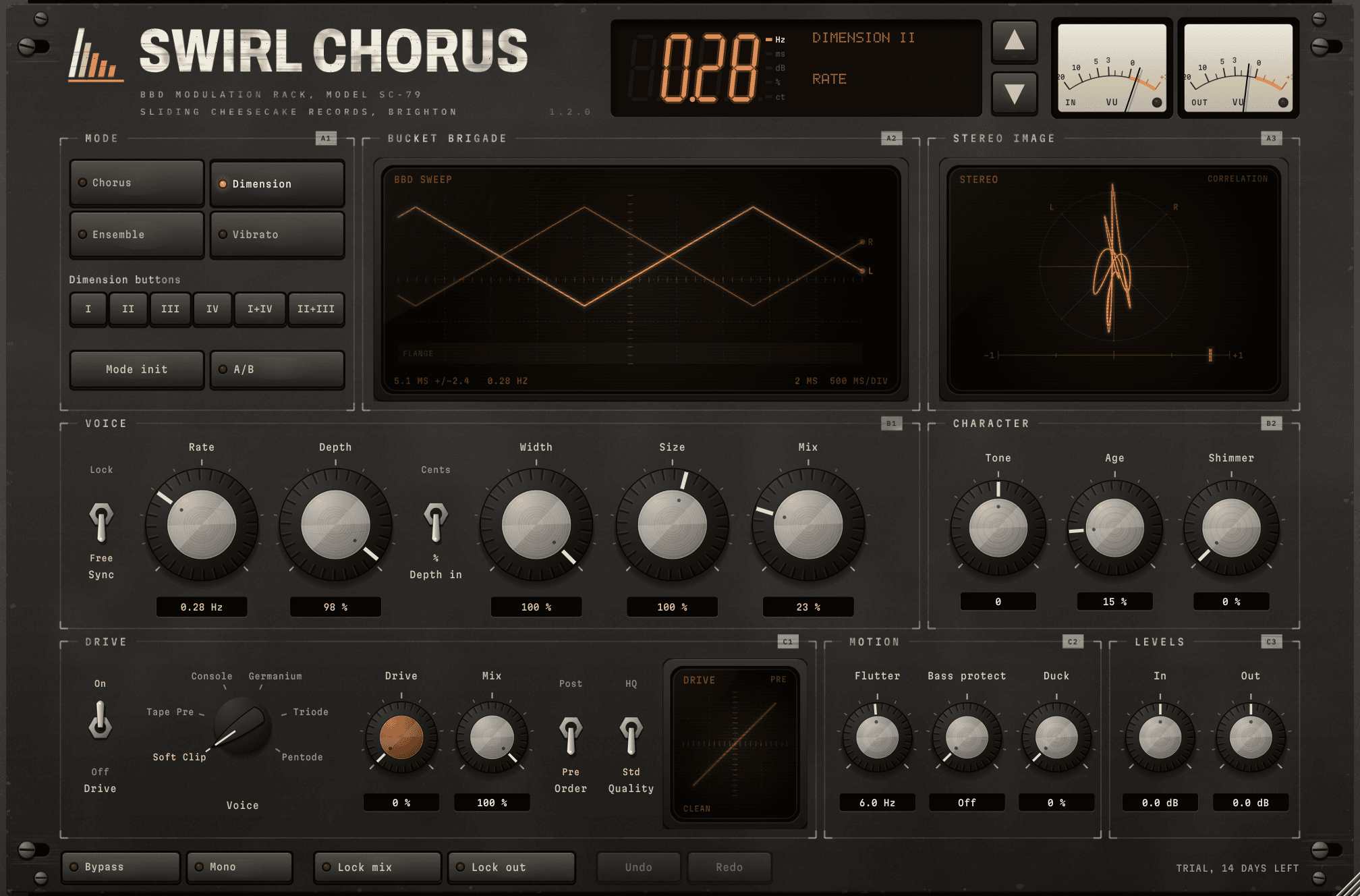
The complete Swirl Chorus window
Fig. 01The "Dimension II" starting point. The Bucket Brigade screen shows the two channels sweeping in opposite directions.

ListenDry / wet, same take, rendered through the plugin

Electric piano

Preset

Silver 78

Dimension II uses 23 % Mix. Dimension Wide uses the same sweep at 50 %.

Clean guitar

Preset

Clean Amp

String synth

Preset

String Machine

All Ensemble mode: three voices per channel a third of a cycle apart.

Polysynth chords, mono source

Preset

Poly Pad

Mono source; stereo width is added by the plugin.

Electric bass

Preset

Bass Widener

Shallow sweep, 35 % mix and Bass Protect at 300 Hz to retain the low end.

Funk bass, drive presets

Preset

Germanium Pedal

Germanium at 83 % Drive before the chorus, 80 % in circuit.

Voice

Preset

Vocal Double

Bright doubling with 40 % Duck and Bass Protect at 160 Hz.

Organ chord

Preset

Organ Swirl

Ensemble at 1.1 Hz with some of the second sweep.

Recorded with a pre-release build, the named factory presets and HQ Drive enabled. Each dry/wet group uses the same source and input gain, with no separate wet normalization. Sources are CC0 recordings from freesound.org.

ModesChorus, Dimension, Ensemble and Vibrato

Chorus

One voice per channel, 5.5 ms centre, quarter-cycle stereo offset

The stereo chorus of the classic dual-BBD units: one delay line per channel, swept around 5.5 ms, with the right channel's sweep a quarter of a cycle behind the left. Rate runs from 0.02 to 8 Hz, free or locked to the host tempo.

Dimension

Opposite stereo sweeps, filtered wet path

Two channels sweep in opposite directions through a filtered wet path for stereo widening. The voicing is based on captures of a reference Dimension plugin. Six Dimension Buttons keys load four button settings and two combinations.

Ensemble

Three voices per channel at 0, 120 and 240°, main sweep plus independent flutter

The string-machine arrangement: three voices per channel, spaced a third of a cycle apart. Flutter sets the second sweep independently of the main Rate; Shimmer blends in that motion, and Size scales all the delay lines together.

Vibrato

One voice, optional depth in cents, used fully wet

A single voice for pitch movement at 100 % wet. Switch Depth to nominal cents to adjust speed while keeping a similar pitch excursion. Seasick uses 20 cents at 0.7 Hz; Pitch Drunk uses 60 cents at 4.2 Hz. Very slow rates or small Size settings can limit the excursion; Shimmer also changes the combined pitch movement.

The wet voices use BBD-inspired bandwidth and soft saturation. Longer delay settings darken the sound; Age blends in additional low-pass filtering, and Tone tilts the wet path.

DriveSoft Clip and five voices, pre or post

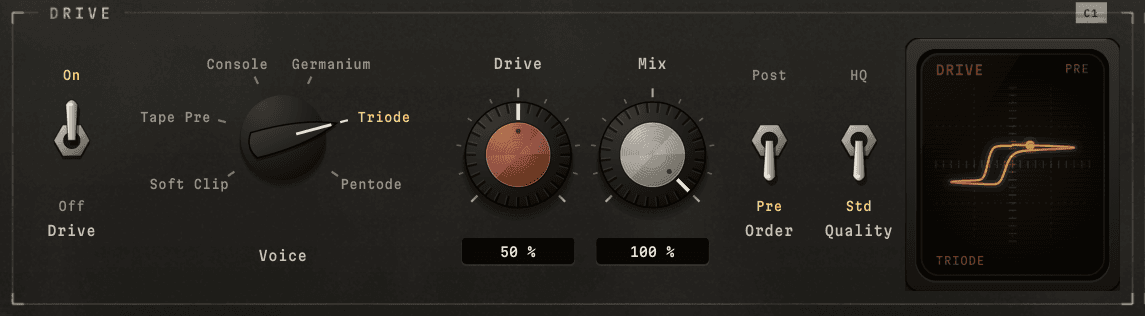
The Drive section with Triode at 50 percent Drive, before the chorus, and its transfer curve on the Drive screen

Drive has its own enable switch and Mix control, before the chorus (Pre) or after it (Post). Choose Soft Clip or one of five voices. The amount runs from 0 to 100 %, with zero clean. Level compensation, calibrated around −15 dBFS RMS input, keeps the level close as you add drive. HQ improves drive quality at a higher CPU cost. The chorus itself stays at the host sample rate.

  • Drive 0 – 100 %, with level compensation calibrated around −15 dBFS RMS input
  • Pre or Post, set with the Order switch
  • Drive Mix: dry/wet for the drive section on its own
  • The Drive switch turns the insert on and off independently of chorus
  • Drive-only oversampling: 8× at Std and 32× at HQ, at 44.1 and 48 kHz
Tape Pre
Two asymmetric stages add even harmonics, signal-dependent bias movement and low-end weight.
Console
A symmetric curve adds odd harmonics and rounds off peaks.
Germanium
A soft knee, moving bias and low-frequency emphasis.
Triode
Strong even harmonics with signal-dependent bias movement.
Pentode
Odd harmonics and flattened peaks, with compression that increases under sustained input.

Front panel

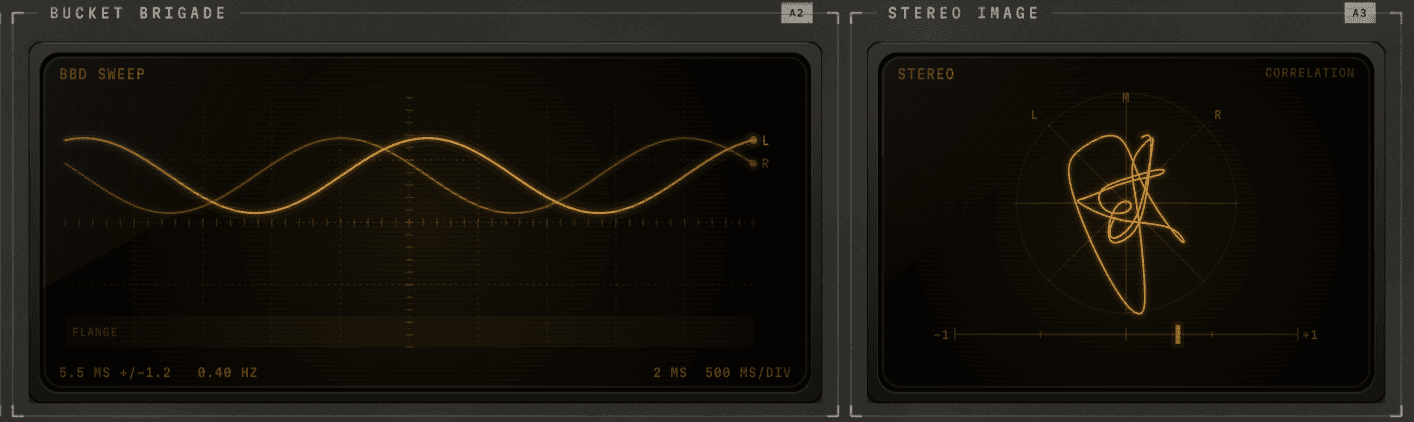
The Bucket Brigade and Stereo Image screens, with the Tape Chorus preset playing a chord

Three screens show what Swirl is doing as it runs. Bucket Brigade draws each voice's delay as it sweeps, following the engine's own sweep, so it locks to tempo when Sync is on. Stereo Image is a goniometer of the output, with the correlation of the two channels on a scale underneath. The Drive screen draws the drive's transfer curve for the chosen voice, Drive and Mix.

Voice and motion

  • Four mode keys; Mode Init loads a starting preset, and changing a mode alone keeps your other settings.
  • Rate, Depth, Width, Size and Mix; optional nominal depth in cents.
  • Sync the slow sweep while setting Flutter independently from 0.2 to 25 Hz.

Tone and mix

  • Bass Protect: Off or 40–500 Hz. Try 300 Hz for bass; drive can still colour the low end.
  • Duck reduces the wet contribution on louder notes, then restores it as the input falls.
  • Tone and Age shape wet colour; In and Out trims run ±12 dB.

Compare and recall

  • A/B keeps two temporary settings for comparison; the first press copies A into B, and its lamp is lit while B is in use.
  • Lock Mix and Lock Out keep those settings while you browse presets.
  • Mono checks the summed output. Bypass compares the original input at matched latency.

Click a knob's value window to type a value, double-click to reset a knob, and use Undo and Redo to step through edits. The LED display shows the preset and the last control you touched; click it for the preset menu. VU meters on the input and output each have a lamp that lights when a peak reaches 0 dBFS, and hovering over one shows its peak and RMS levels. The window opens at 1008 by 664 pixels and resizes from 75 % to 200 % of that. Mode and drive changes use short fades to reduce switching clicks. Read the Swirl manual for setup and control details.

Presets53 factory presets, plus your own

  • Basics3
  • Chorus13
  • Dimension11
  • Ensemble10
  • Vibrato8
  • Drive8

An asterisk marks an edited preset. Save your own presets as shareable XML files. A/B slots and Mix/Out locks last for the plugin instance and are not saved with the project. HQ, Bypass and Mono stay unchanged when loading a preset.

Specifications

Formats
VST3, AU, CLAP and Standalone on macOS. VST3, CLAP and Standalone on Windows.
macOS
11 or later, Apple silicon and Intel (universal)
Windows
10 or later, 64-bit
Voices
Up to 3 per channel, BBD-modelled; Size 25 – 160 %
Rate
0.02 – 8 Hz free; 8 bars – 1/4 note synced
Flutter
0.2 – 25 Hz, independent of Rate and Sync
Drive
Soft Clip + 5 voices, 0 – 100 %, pre or post, own dry/wet
Sample rates
44.1 – 192 kHz; drive oversampling adapts to host rate
Latency
136 samples at either quality and in bypass (2.83 ms at 48 kHz); reported to the host
Price
£29, one-time, with a 14-day trial

Buying and using Swirl

One purchase covers Mac and Windows for one person on up to five activated computers. Use it offline after activation. Version 1.x updates are included, with no subscription.

Availabilityv1.2.1, Oct 2026

Swirl Chorus 1.2.1 is available now for macOS and Windows: £29, one-time, with a 14-day trial that needs no card or email address.

Changeloglatest, 1.2.1

1.2.1

  • The Bucket Brigade screen's scale now works like an oscilloscope's: six divisions up the screen, at 0.5, 1, 2 or 5 ms each, shown at the bottom left as DELAY, with the time a division across shown at the bottom right as TIME. A mark at the left edge shows where 0 ms is.
  • Size, the mode and the Depth in switch set that scale, and Depth sets only how far the lines swing, so they no longer jump up or down the screen as you turn it. With Depth in cents, the sweep's speed can change the scale too, since it sets the swing there: Rate, or Note and your host's tempo when Sync is at Lock.
  • The sweep's centre, swing and rate are now shown at the top right of the screen.
  • The Drive screen's curve no longer moves up and down as you turn Drive, Mix or Voice. Every voice but Soft Clip re-centres a loud, steady tone, which moved the curve; it is now drawn through the centre of the screen. The test tone also runs longer before the curve is drawn, so the ends of a loop meet.
  • No changes to the sound, parameters, presets or saved sessions.

Full changelog